In today’s digital world, your online community profile is more than just a username—it’s your identity. Whether you are part of a learning platform, social forum, or professional network, your profile represents who you are, what you do, and how others perceive you. Personalizing your community profile is one of the easiest ways to stand out, build credibility, and connect with like-minded people.
But what is the easiest way to personalize a community profile online? Let’s explore practical and beginner-friendly methods that can instantly improve your online presence.
Why Personalizing Your Profile Matters
Before diving into the “how,” it’s important to understand the “why.” A well-personalized profile helps you:
- Build trust within the community
- Express your personality and interests
- Increase engagement with others
- Improve visibility and credibility
Online communities are designed to connect people with shared interests. According to studies on digital communities, they allow users to “connect, share expertise, and create conversation” . A personalized profile makes this interaction more meaningful.
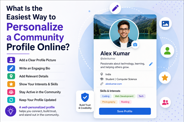
1. Choose a Clear and Authentic Profile Picture
The easiest and most impactful step is adding a profile picture.
- Use a clear, high-quality image
- Prefer a real photo over avatars (for professional communities)
- Keep it friendly and approachable
Your profile picture is the first thing people notice. A genuine image builds trust and makes your profile more relatable.
2. Write a Simple and Engaging Bio
Your bio is your introduction. Keep it short but meaningful.
Include:
- Your name or nickname
- Your interests or skills
- What you aim to do in the community
For example:
“Student passionate about coding and digital marketing. Here to learn and share ideas.”
Personalized content that reflects your interests helps you connect better with others and communicate effectively .
3. Add Relevant Details (But Keep It Safe)
Many platforms allow you to add extra details like:
- Location (optional)
- Skills or expertise
- Hobbies
- Links to your work
However, don’t overshare personal information. Keep your profile informative but safe, especially when interacting in public communities.
4. Customize Your Username Wisely
Your username is your digital identity.
Tips:
- Keep it simple and easy to remember
- Avoid random numbers or complicated symbols
- Make it relevant to your personality or niche
For example:
- Bad: user12345xyz
- Good: DivyamCodes or LearnWithDivyam
A clean username improves recognition and makes your profile look professional.
5. Use a Consistent Theme Across Platforms
If you are active on multiple platforms, maintain consistency:
- Same profile picture
- Similar usernames
- Matching bio style
This creates a strong personal brand and helps people recognize you easily across communities.
6. Share Your Interests and Activity
A profile becomes truly personalized when it reflects your activity.
- Participate in discussions
- Share posts or comments
- Join relevant groups or topics
Profiles with active engagement appear more authentic and trustworthy. A profile with little or no activity may seem incomplete or less credible .
7. Add Visual Elements (If Available)
Some platforms allow customization like:
- Cover photos
- Themes or colors
- Badges or achievements
Use these features to make your profile visually appealing. Just don’t overdo it—keep it clean and organized.
8. Highlight Your Achievements or Skills
If the platform allows, showcase:
- Certifications
- Projects
- Achievements
- Skills
This is especially useful in learning or professional communities. It helps others understand your expertise and encourages collaboration.
9. Keep Updating Your Profile
Personalization is not a one-time task. Keep your profile updated:
- Add new skills
- Update your bio
- Change your profile picture when needed
An updated profile reflects growth and keeps your presence relevant.
10. Stay Authentic and Honest
The most important rule: be yourself.
Avoid:
- Fake information
- Misleading details
- Over-exaggeration
Authenticity builds long-term trust and meaningful connections in any online community.
Common Mistakes to Avoid
While personalizing your profile, avoid these mistakes:
- Using blurry or inappropriate images
- Writing overly long or confusing bios
- Leaving sections incomplete
- Copying someone else’s profile style
- Sharing too much personal information
A balanced and genuine profile always performs better than an overly complex one.
Quick Checklist for Easy Personalization
Here’s a simple checklist you can follow:
✔ Add a clear profile picture
✔ Write a short, engaging bio
✔ Choose a clean username
✔ Share your interests and skills
✔ Stay active in the community
✔ Keep your profile updated
Final Thoughts
Personalizing your community profile online doesn’t have to be complicated. In fact, the easiest way is to focus on small but meaningful changes—like adding a photo, writing a simple bio, and staying active.
Your profile is your digital identity. When you take a few minutes to personalize it properly, you open doors to better connections, learning opportunities, and growth within the community.
Start simple, stay authentic, and let your profile reflect who you truly are.